TOEIC L&R Public Test Admission Ticket Photo: Size and How to Create
Prepare a TOEIC admission ticket photo that meets IIBC official rules exactly, from a smartphone shot and AI processing, for ¥200.
- Pay after preview · refund guaranteed
- Matches the official spec (verified 2026-05-27)
- Print at any Japan conbini
| Dimensions | 40mm × 30mm | Height × Width |
|---|---|---|
| Face length | Not specified | |
| Top margin | Not specified | |
| Background | White or pale color — explicitly required by the official rules. Use a light wall with even lighting so no shadow falls on the face. | |
| Shoot-by window | Taken within 6 months of application | |
| Official issuer | The Institute for International Business Communication (IIBC) | 2026-05-27 |
View the official source ↗(Last verified: 2026-05-27)
Only photos taken within the last 6 months are valid — check when your current photo was taken.
Turn a phone shot into a photo that meets this exact spec. Preview the result first — then pay ¥200. Full refund if it's rejected.
Create with this specVerbatim official spec
The verbatim official spec from IIBC (The Institute for International Business Communication) is shown below in the original Japanese.
- 「縦4cm×横3cmのものを1枚ご用意ください。」
- 「カラー・モノクロ、どちらもお使いいただけますが、公式認定証にはモノクロで印刷されます。」
- 「6ヶ月以内に撮影、白または薄い色、正面を向いたご本人の顔がはっきり確認でき(顔に影がないもの)、頭部全体が写っているもの」
- 「受験票の証明写真貼付欄の水色の外枠にあわせて、必ずのりを使用して貼ってください」
Why this spec matters
This page covers the photo for the TOEIC L&R (Listening & Reading) public test admission ticket. TOEIC S&W (Speaking & Writing), TOEIC Bridge S&W, and IP tests (group testing for companies and schools) do not require a photo, so this service is not needed for those formats. For the L&R public test, you do not upload a photo at registration — you print the photo yourself and physically paste it onto the admission ticket, which is mailed to you about two weeks before the test. On test day you bring the admission ticket (with photo already attached) and a valid ID. Write your name and seat number on the back of the photo, and paste it inside the light-blue outline on the admission ticket using glue. Double-sided tape and cellophane tape are not recommended by the official rules. Required: 40mm tall × 30mm wide, taken within 6 months, white or pale-color background, front-facing with no hat, the whole head in frame, and no shadow on the face.
Price & risk comparison
Preview free → pay only if you like it / full refund if rejected
No retakes — final on the spot
Booking & visit required
1–2 weeks lost
* Other prices are typical market estimates. With Ramune you pay only after seeing the result, with a full refund if the photo is rejected.
Preview your photo free firstHow to create it for ¥200
With a smartphone and ¥200, you can prepare a TOEIC admission-ticket photo in about two minutes.
- 1
Take the photo on your smartphone
Stand against a white wall in a bright room, facing the camera directly. No hat, even lighting so no shadow falls on the face, and frame the whole head inside the screen. - 2
AI removes the background and aligns to spec
Upload the photo. AI removes the background and detects your face, then auto-crops to TOEIC spec (40mm × 30mm). You can fine-tune position to 0.1mm precision. - 3
Print at a Japan convenience store via QR code → paste on admission ticket
After payment, a QR code is emailed to you. Print at any convenience store in Japan for ¥30 (L-size), write your name and seat number on the back, then paste inside the light-blue outline on the admission ticket using glue.
Create a TOEIC Admission-Ticket Photo for ¥200
AI auto-adjusts your smartphone shot to the TOEIC 40×30mm spec. The QR code for convenience-store printing in Japan is emailed to you.
Create now — ¥200What Ramune AI ID Photo offers
Even for a tight spec like My Number, you can finish the entire shoot → process → print workflow in your browser.
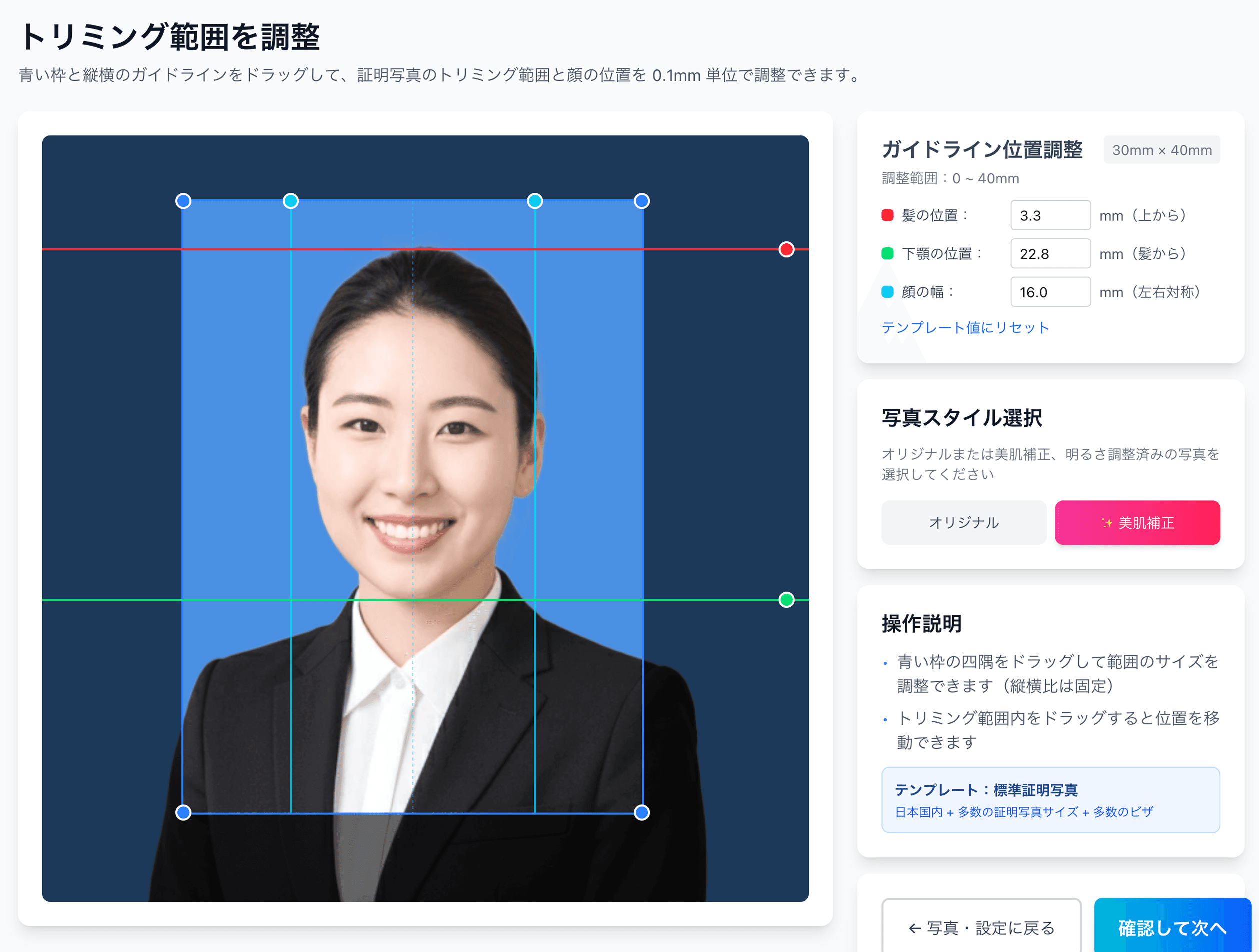
0.1mm face position adjustment
Drag the hairline, chin, and face-width guides — or type the millimetre value — to fit inside even a 4mm-wide regulatory window like the My Number spec.
Auto-generated L-size print sheet
Multiple photos optimally arranged on L-size paper with cut marks. Print directly at home or at a convenience store.
AI removes the background automatically
Walls or objects in the original shot are auto-removed; AI converts the photo to the plain background the spec requires.
AI skin smoothing with a natural finish
Auto-reduces blemishes and uneven tone while keeping a natural look. Choose between the original and the smoothed version.
Print at 55,000 convenience stores nationwide
Scan the QR code at the multi-copy machine in Lawson, FamilyMart, Ministop, or Poplar — L-size prints from ¥30. At 7-Eleven, register the image with netprint first.
5-language support, no app required
Japanese, English, Chinese, Korean, and Vietnamese — works entirely in your smartphone browser without installing an app.
Frequently asked questions
Do TOEIC S&W or IP tests also need a photo?
Do I need to upload a photo online at registration?
Can I print the photo in black and white?
What is the light-blue outline on the admission ticket?
What should I write on the back of the photo?
What if my photo was the wrong size and got rejected?
Related content
Related blog
Japanese ID Photo Face Position: 0.1mm to Pass Any Spec
In Japan, passport, My Number and residence-card photos share a tight 4mm face tolerance (ICAO Doc 9303). Hit 0.1mm with AI for ¥200, print at a konbini.
Related blog
Glasses ID Photo in Japan: 7 No-Glare Techniques (2026)
In Japan, glasses glare forces ID photo reshoots. Glare is fixed at the shoot, not in software: 7 techniques plus the 4 agencies’ NG rules, from ¥200.
Related spec
Eiken (STEP English Test)
30mm × 24mm
Related spec
Japan Kanji Aptitude Test (Kanken)
40mm × 30mm
Related spec
Resume
40mm × 30mm
Create a TOEIC Admission-Ticket Photo for ¥200
AI auto-adjusts your smartphone shot to the TOEIC 40×30mm spec. The QR code for convenience-store printing in Japan is emailed to you.
Create now — ¥200