Kanken (Japan Kanji Aptitude Test): Photo Spec and How to Create It
Make a Kanken admission-card photo that meets the official guidance from the Japan Kanji Aptitude Testing Foundation, from a smartphone shot, for ¥200.
- Pay after preview · refund guaranteed
- Matches the official spec (verified 2026-05-27)
- Print at any Japan conbini
| Dimensions | 40mm × 30mm | Height × Width |
|---|---|---|
| Face length | Not specified | |
| Top margin | Not specified | |
| Background | Background color is not officially specified — a plain white or light-colored background is generally safe | |
| Shoot-by window | Taken within 6 months of application | |
| Official issuer | The Japan Kanji Aptitude Testing Foundation | 2026-05-27 |
View the official source ↗(Last verified: 2026-05-27)
Only photos taken within the last 6 months are valid — check when your current photo was taken.
Turn a phone shot into a photo that meets this exact spec. Preview the result first — then pay ¥200. Full refund if it's rejected.
Create with this specVerbatim official spec
Below are the original Japanese passages from the official "Exam Flow" page and the official FAQ published by the Japan Kanji Aptitude Testing Foundation.
- 「検定当日、受検票に顔写真(タテ4cm×ヨコ3cm、6か月以内に撮影、上半身無帽・マスクなし、正面)を貼り付けて持参してください。」
- 「【1級・準1級・2級・準2級・3級の方へ】※2024年度第1回検定より3級も対象です」
- 「顔写真を貼付しない場合、検定結果資料の発送が差し止められます」
- 「顔写真は、縦4cm×横3cm、マスクなし、6ヶ月以内に撮影したもの、上半身無帽、正面を向いているお写真のご用意をお願いします」
- 「白黒でも可 / プリクラおよびプリクラで撮った証明写真は不可」
Why this spec matters
Photos are required only for in-person paper-based testing (PBT) at Levels 1, Pre-1, 2, Pre-2, and 3. Levels 4 through 10, CBT (computer-based testing), and testing at affiliated venues such as schools and cram schools do not require a photo. Note especially that Level 3 added the photo requirement from the 2024 first sitting onward — if you sat the exam before that, or are following older information, this is a recent change. The official guidance also states that if no photo is affixed to the admission card, the foundation will suspend dispatch of result documents. The spec calls for a 40×30mm photo taken within the past six months, upper body, no hat, no mask, facing forward. Color and black-and-white are both acceptable, but the official FAQ explicitly prohibits photos taken with purikura (sticker-photo) booths.
Price & risk comparison
Preview free → pay only if you like it / full refund if rejected
No retakes — final on the spot
Booking & visit required
1–2 weeks lost
* Other prices are typical market estimates. With Ramune you pay only after seeing the result, with a full refund if the photo is rejected.
Preview your photo free firstHow to create it for ¥200
With a smartphone and ¥200, you can prepare a Kanken admission-card photo in time for exam day without stress.
- 1
Take the photo on your smartphone
Stand against a plain wall in a bright room. Upper body, no hat, no mask, neutral expression or slight smile, eyes on the lens. Make sure no fringe covers your eyes. - 2
AI removes the background and fits the spec
Upload the photo. AI removes the background, detects your face, and auto-crops to the Kanken spec (40×30mm). Fine-tune face position to 0.1mm precision if needed. - 3
Print at a Japan convenience store via QR code, then glue onto the admission card
After payment, a QR code and 8-digit user number arrive by email. Print on L-size paper at any Japan convenience store (7-Eleven, FamilyMart, Lawson, Ministop, etc.) from ¥30, cut out the photo, glue it onto your admission card, and bring it to the exam venue.
Create a Kanken Admission Photo for ¥200
AI auto-adjusts your smartphone shot to the 40×30mm Kanken spec. A QR code for convenience-store printing is emailed to you.
Create now — ¥200What Ramune AI ID Photo offers
Even for a tight spec like My Number, you can finish the entire shoot → process → print workflow in your browser.
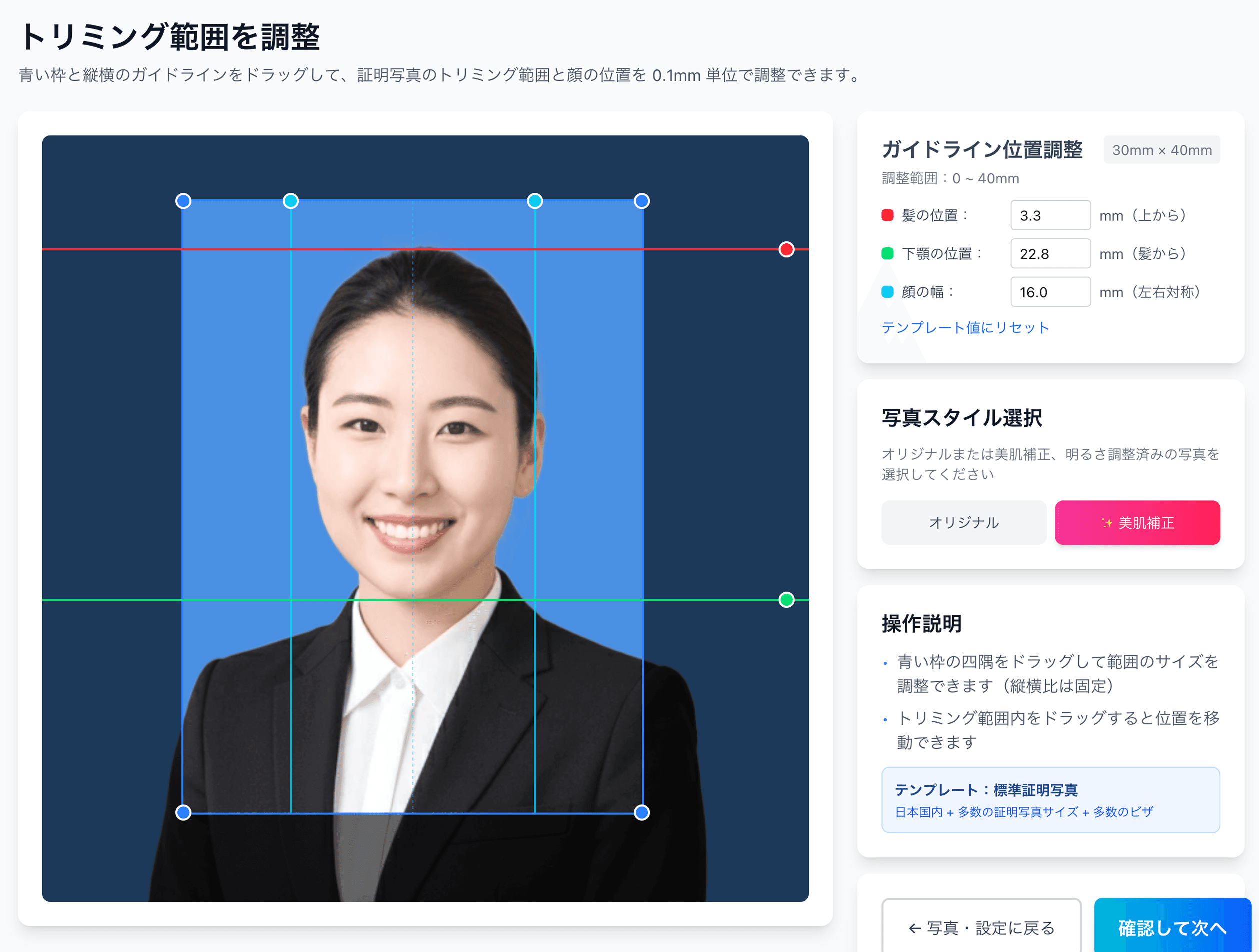
0.1mm face position adjustment
Drag the hairline, chin, and face-width guides — or type the millimetre value — to fit inside even a 4mm-wide regulatory window like the My Number spec.
Auto-generated L-size print sheet
Multiple photos optimally arranged on L-size paper with cut marks. Print directly at home or at a convenience store.
AI removes the background automatically
Walls or objects in the original shot are auto-removed; AI converts the photo to the plain background the spec requires.
AI skin smoothing with a natural finish
Auto-reduces blemishes and uneven tone while keeping a natural look. Choose between the original and the smoothed version.
Print at 55,000 convenience stores nationwide
Scan the QR code at the multi-copy machine in Lawson, FamilyMart, Ministop, or Poplar — L-size prints from ¥30. At 7-Eleven, register the image with netprint first.
5-language support, no app required
Japanese, English, Chinese, Korean, and Vietnamese — works entirely in your smartphone browser without installing an app.
Frequently asked questions
Can I upload the photo online for the Kanken (Japan Kanji Aptitude Test)?
Do I need a photo for Level 3 as well?
Are photos required for Level 4 and below, or for CBT and affiliated venues?
Can I use a purikura photo instead?
Color or black-and-white — which is preferred?
What happens if I forget to affix the photo to the admission card?
What if my photo was the wrong size and got rejected?
Related content
Related blog
Japanese ID Photo Face Position: 0.1mm to Pass Any Spec
In Japan, passport, My Number and residence-card photos share a tight 4mm face tolerance (ICAO Doc 9303). Hit 0.1mm with AI for ¥200, print at a konbini.
Related spec
Eiken (STEP English Test)
30mm × 24mm
Related spec
TOEIC
40mm × 30mm
Related spec
Resume
40mm × 30mm
Create a Kanken Admission Photo for ¥200
AI auto-adjusts your smartphone shot to the 40×30mm Kanken spec. A QR code for convenience-store printing is emailed to you.
Create now — ¥200