Eiken (Japan English Proficiency Test) ID-Confirmation Photo: Spec and How to Create It
Make an Eiken exam photo for the paper-based (main and associate venues) test that meets the Eiken Foundation's official spec, from a smartphone shot, for ¥200. Applies to Grade 1, Pre-1, 2, Pre-2, and 3.
- Pay after preview · refund guaranteed
- Matches the official spec (verified 2026-05-27)
- Print at any Japan conbini
| Dimensions | 30mm × 24mm | Height × Width |
|---|---|---|
| Face length | Not specified | |
| Top margin | Not specified | |
| Background | No background color specified officially — only "upper body, no hat, front-facing" is required. A plain, light-colored wall under even lighting is recommended | |
| Shoot-by window | Taken within 6 months of application | |
| Official issuer | Eiken Foundation of Japan | 2026-05-27 |
View the official source ↗(Last verified: 2026-05-27)
Only photos taken within the last 6 months are valid — check when your current photo was taken.
Turn a phone shot into a photo that meets this exact spec. Preview the result first — then pay ¥200. Full refund if it's rejected.
Create with this specVerbatim official spec
Below is the verbatim official spec from the Eiken Foundation of Japan regarding the ID-confirmation card photo, in the original Japanese.
- 「本人確認票の写真貼付欄に顔写真(縦3cm×横2.4cm)を必ず貼り」
- 「最近6ヵ月以内撮影」
- 「上半身、無帽、正面」
- 「モノクロ・カラーどちらも可」
- 「1級〜3級受験者は、本人確認票に写真を必ず貼ってください」
Why this spec matters
This page covers the photo to be glued onto the ID-confirmation card for the paper-based Eiken test (main and associate venues, PBT format). The S-CBT format uses an entirely different image-upload system (JPEG/PNG, 4:3 ratio, up to 6MB), so the 30×24mm print created by this service cannot be used for S-CBT. The ID-confirmation card is mailed roughly one week before the exam; candidates glue a 30×24mm photo into the designated slot and bring it on exam day for cross-checking with photo ID. Grade 1, Pre-1, 2, Pre-2, and 3 candidates cannot sit the exam without the photo affixed (Grades 4 and 5 do not require a photo). From the 2026 academic year, candidates for Grades 1 through 3 must additionally bring an original photo ID such as a driver's license; the photo spec itself has not changed. Tolerances are not numerically published, but the basic rules (upper body, no hat, front-facing, within 6 months) are strictly enforced — meeting the spec on the first shot saves repeat trips.
Price & risk comparison
Preview free → pay only if you like it / full refund if rejected
No retakes — final on the spot
Booking & visit required
1–2 weeks lost
* Other prices are typical market estimates. With Ramune you pay only after seeing the result, with a full refund if the photo is rejected.
Preview your photo free firstHow to create it for ¥200
With a smartphone and ¥200, you can prepare a spec-compliant Eiken paper-based ID-card photo in one go before sitting Grade 1 through Grade 3.
- 1
Take the photo on your smartphone
Stand against a plain, light-colored wall in a bright room. Frame the upper body, no hat, facing the camera directly. Natural expression, eyes on the lens. Clear-lens glasses can stay on if worn the same way on test day. - 2
AI removes the background and fits the spec
Upload the photo. AI removes the background, detects your face, and auto-crops to the 30×24mm Eiken ratio. Fine-tune the face position to 0.1mm precision if needed. - 3
Print at a Japan convenience store via QR code, then glue onto the ID-confirmation card
After payment, a QR code and 8-digit user number arrive by email. Print on L-size paper at any Japan conbini from ¥30. Cut out the photo and glue it onto the ID-confirmation card that arrives roughly one week before the exam, then bring it on exam day along with a photo ID.
Create a Spec-Compliant Eiken Paper-Based Photo for ¥200
AI auto-adjusts your smartphone shot to the 30×24mm Eiken spec. A QR code for convenience-store printing is emailed to you.
Create now — ¥200What Ramune AI ID Photo offers
Even for a tight spec like My Number, you can finish the entire shoot → process → print workflow in your browser.
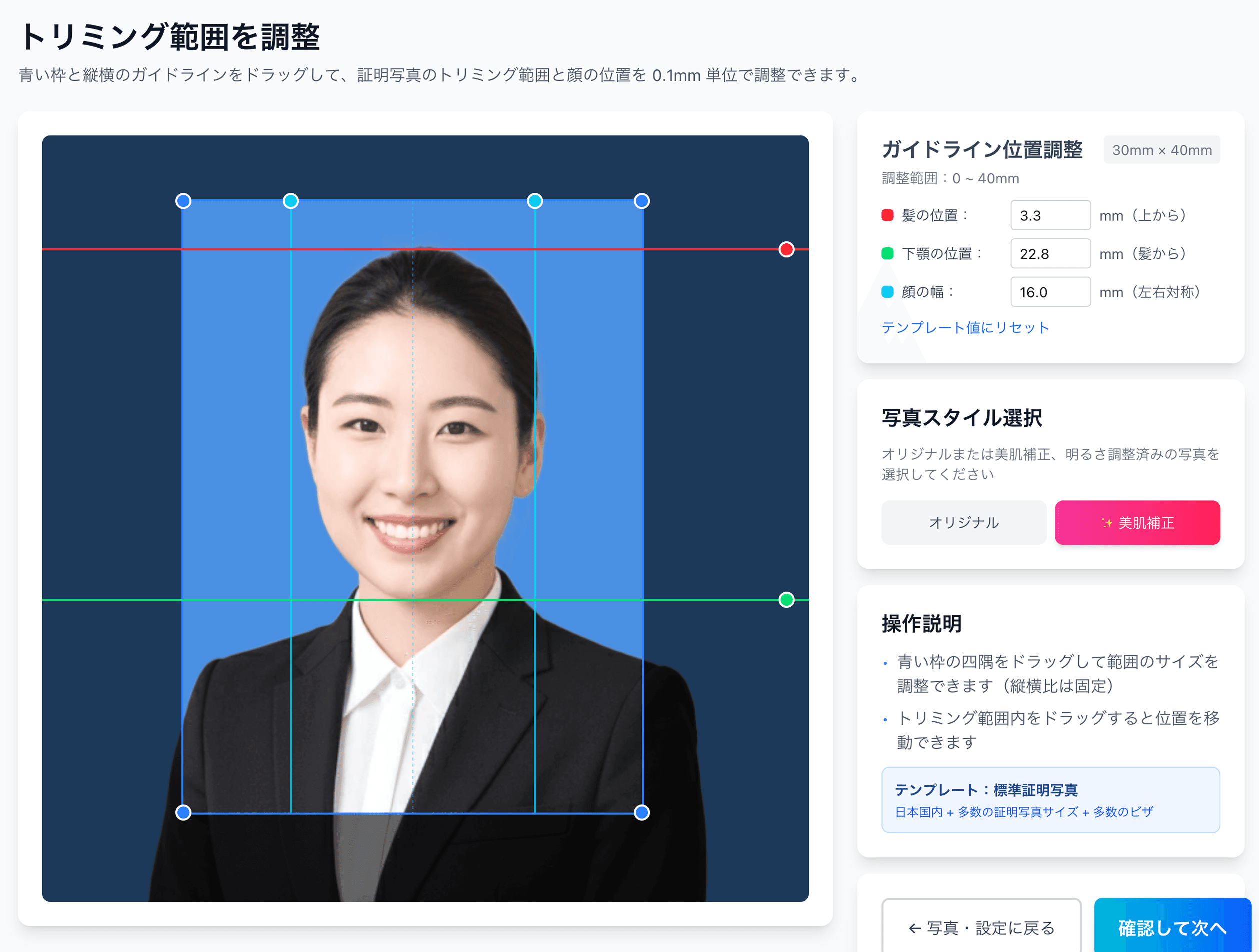
0.1mm face position adjustment
Drag the hairline, chin, and face-width guides — or type the millimetre value — to fit inside even a 4mm-wide regulatory window like the My Number spec.
Auto-generated L-size print sheet
Multiple photos optimally arranged on L-size paper with cut marks. Print directly at home or at a convenience store.
AI removes the background automatically
Walls or objects in the original shot are auto-removed; AI converts the photo to the plain background the spec requires.
AI skin smoothing with a natural finish
Auto-reduces blemishes and uneven tone while keeping a natural look. Choose between the original and the smoothed version.
Print at 55,000 convenience stores nationwide
Scan the QR code at the multi-copy machine in Lawson, FamilyMart, Ministop, or Poplar — L-size prints from ¥30. At 7-Eleven, register the image with netprint first.
5-language support, no app required
Japanese, English, Chinese, Korean, and Vietnamese — works entirely in your smartphone browser without installing an app.
Frequently asked questions
Can I use the same photo for the S-CBT format?
Do Grade 4 and Grade 5 candidates need a photo too?
Should I take off my glasses?
Tell me about the 2026 photo-ID requirement.
Is black-and-white printing acceptable?
What if my photo was the wrong size and got rejected?
Related content
Related blog
Japanese ID Photo Face Position: 0.1mm to Pass Any Spec
In Japan, passport, My Number and residence-card photos share a tight 4mm face tolerance (ICAO Doc 9303). Hit 0.1mm with AI for ¥200, print at a konbini.
Related spec
Japan Kanji Aptitude Test (Kanken)
40mm × 30mm
Related spec
TOEIC
40mm × 30mm
Related spec
Weather Forecaster Exam
45mm × 35mm
Create a Spec-Compliant Eiken Paper-Based Photo for ¥200
AI auto-adjusts your smartphone shot to the 30×24mm Eiken spec. A QR code for convenience-store printing is emailed to you.
Create now — ¥200