Japan Sharoshi (Social Insurance & Labor Consultant) Exam: Application Photo Spec and How to Create It
Create a Sharoshi exam application photo that meets the official spec from the National Federation of Labor and Social Security Attorneys Associations, from a smartphone shot, for ¥200. Built for the fully online application (upload through the My Page portal).
- Pay after preview · refund guaranteed
- Matches the official spec (verified 2026-05-27)
- Print at any Japan conbini
| Dimensions | 45mm × 35mm | Height × Width |
|---|---|---|
| Face length | Not specified | |
| Top margin | Not specified | |
| Background | A plain background is required — shoot against a plain wall under even lighting | |
| Shoot-by window | Taken within 6 months of application | |
| Official issuer | Examination Center, National Federation of Labor and Social Security Attorneys Associations | 2026-05-27 |
View the official source ↗(Last verified: 2026-05-27)
Only photos taken within the last 6 months are valid — check when your current photo was taken.
Turn a phone shot into a photo that meets this exact spec. Preview the result first — then pay ¥200. Full refund if it's rejected.
Create with this specVerbatim official spec
The verbatim official spec from the Examination Center, National Federation of Labor and Social Security Attorneys Associations, is shown below in the original Japanese.
- 「申込前6か月以内に撮影した」
- 「無背景(無地の壁等は可)」
- 「カラー写真(白黒不可)」
- 「受験時に眼鏡を着用する場合は、眼鏡を着用して撮影したもの」
- 「平常の顔貌と著しく異なる(笑顔、画像を加工している等)」
Why this spec matters
The Sharoshi (Social Insurance and Labor Consultant) qualification, established under the 1968 Social Insurance and Labor Consultant Act, is a national license for handling labor and social-insurance filings — covering the Labor Standards Act, workers' compensation, employment insurance, health insurance, and employees' pension — plus drafting work rules and providing labor consulting. Filing the so-called Type 1 and Type 2 documents is a Sharoshi-exclusive monopoly; neighboring professions such as administrative scriveners, tax accountants, and judicial scriveners cannot perform this work. In Reiwa 7 (the 57th exam), 53,618 applied, 43,421 sat the exam, and only 2,376 passed — a 5.5% pass rate, down from 6.9% the previous year, making it one of Japan's most difficult national qualifications. The exam runs once a year on the fourth Sunday of August, with an 80-minute multiple-choice section and a 210-minute selection section on paper; there are no plans to move to CBT for Reiwa 8. Applications are fully online: you register on the My Page portal, upload your photo, and then pay the exam fee, so any spec issue means re-uploading and potential application delays.
Price & risk comparison
Preview free → pay only if you like it / full refund if rejected
No retakes — final on the spot
Booking & visit required
1–2 weeks lost
* Other prices are typical market estimates. With Ramune you pay only after seeing the result, with a full refund if the photo is rejected.
Preview your photo free firstHow to create it for ¥200
With a smartphone and ¥200, you can create a spec-compliant photo ready for the Sharoshi exam's fully online application.
- 1
Take the photo on your smartphone
Stand against a plain wall in a bright room. No hat, only yourself in the frame, mouth closed, neutral expression. If you wear glasses during the exam, wear them in the photo too. - 2
AI removes the background and aligns to spec
Upload the photo. AI removes the background and outputs a spec-compliant 35×45mm color photo as a natural, unretouched JPG under 3MB. - 3
Upload through My Page → pay the exam fee
The Sharoshi exam is fully online with no paper application. Register on the Examination Center's My Page portal, upload your spec-compliant file, then pay the exam fee.
Create a Spec-Compliant Sharoshi Exam Photo for ¥200
AI auto-adjusts your smartphone shot to the 35×45mm color spec. The output is a JPG under 3MB, ready to upload directly to the fully online application.
Create now — ¥200What Ramune AI ID Photo offers
Even for a tight spec like My Number, you can finish the entire shoot → process → print workflow in your browser.
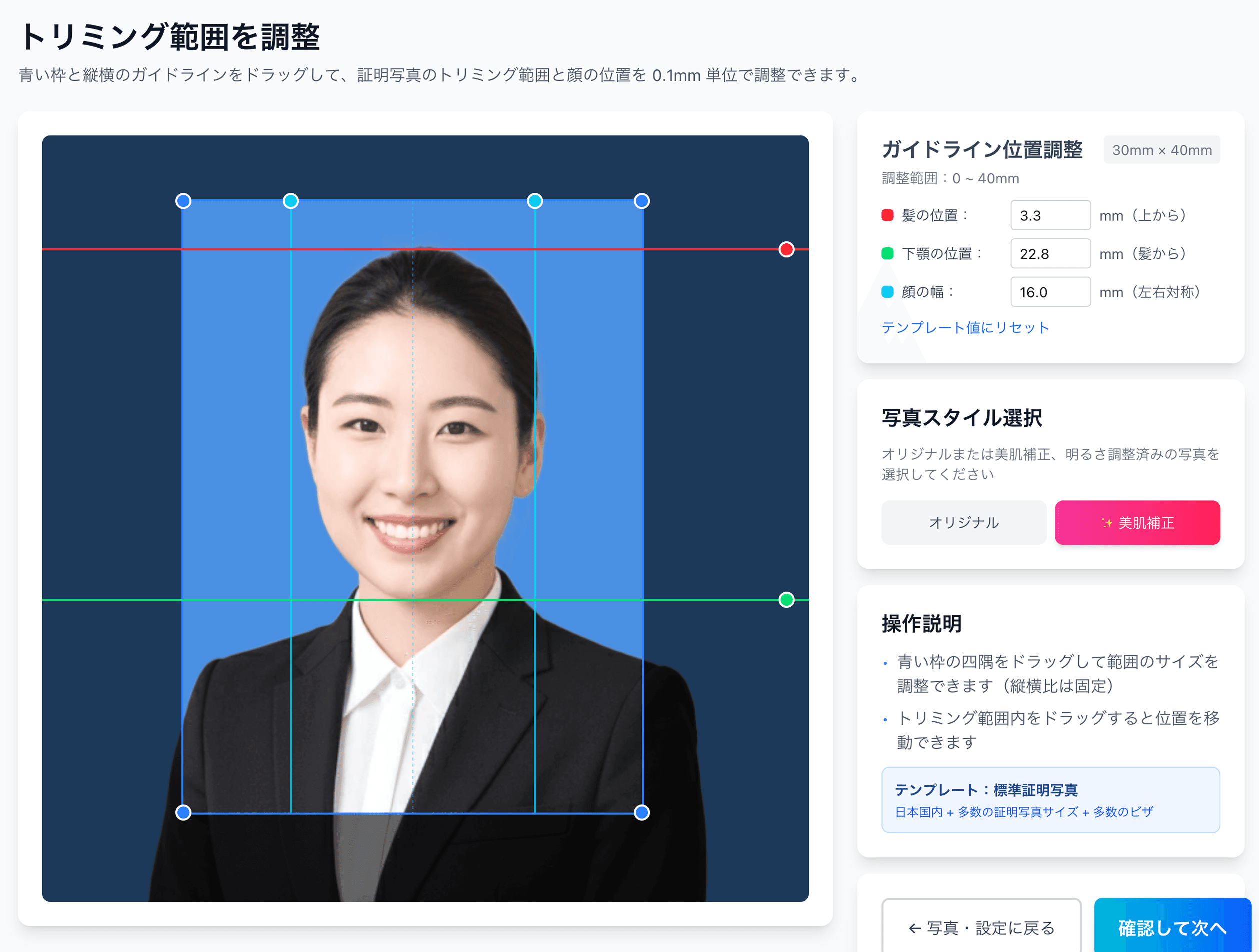
0.1mm face position adjustment
Drag the hairline, chin, and face-width guides — or type the millimetre value — to fit inside even a 4mm-wide regulatory window like the My Number spec.
Auto-generated L-size print sheet
Multiple photos optimally arranged on L-size paper with cut marks. Print directly at home or at a convenience store.
AI removes the background automatically
Walls or objects in the original shot are auto-removed; AI converts the photo to the plain background the spec requires.
AI skin smoothing with a natural finish
Auto-reduces blemishes and uneven tone while keeping a natural look. Choose between the original and the smoothed version.
Print at 55,000 convenience stores nationwide
Scan the QR code at the multi-copy machine in Lawson, FamilyMart, Ministop, or Poplar — L-size prints from ¥30. At 7-Eleven, register the image with netprint first.
5-language support, no app required
Japanese, English, Chinese, Korean, and Vietnamese — works entirely in your smartphone browser without installing an app.
Frequently asked questions
How does it differ from the administrative scrivener exam?
How does it differ from the tax accountant exam?
Why isn't smiling allowed?
Is any image editing acceptable, including the smartphone's built-in enhancements?
Can anyone take the exam?
What if my photo was the wrong size and got rejected?
Related content
Related blog
Japanese ID Photo Face Position: 0.1mm to Pass Any Spec
In Japan, passport, My Number and residence-card photos share a tight 4mm face tolerance (ICAO Doc 9303). Hit 0.1mm with AI for ¥200, print at a konbini.
Related blog
Japan Job-Hunting (Shukatsu) Photo: Recruiter Truth, ¥200
In Japan, 87.3% of new grads say the recruit photo matters. Face left unretouched — only position and background fit the 4×3cm spec. Studio quality for ¥200.
Related spec
Small and Medium Enterprise Management Consultant Exam
45mm × 35mm
Related spec
Tax Accountant Exam
45mm × 35mm
Related spec
Patent Attorney Exam
40mm × 30mm
Create a Spec-Compliant Sharoshi Exam Photo for ¥200
AI auto-adjusts your smartphone shot to the 35×45mm color spec. The output is a JPG under 3MB, ready to upload directly to the fully online application.
Create now — ¥200