Japan Common Test (Kyotsu Test) Photo Spec and How to Create It
Applications for Reiwa 9 run 15 Sept to 2 Oct. Turn one smartphone shot into an upper-body, no-hat, plain-background photo file for ¥200.
- Pay after preview · refund guaranteed
- Matches the official spec (verified 2026-08-20)
- Print at any Japan conbini
| Dimensions | 40mm × 30mm | Height × Width |
|---|---|---|
| Face length | Not specified | |
| Top margin | Not specified | |
| Background | Plain background — no specific color, but the facial outline must be clearly distinguishable | |
| Shoot-by window | Taken on or after 1 July 2026 (Reiwa 9 application; the floor moves forward one year each cycle) | |
| Official issuer | National Center for University Entrance Examinations (DNC) | 2026-08-20 |
View the official source ↗(Last verified: 2026-08-20)
Turn a phone shot into a photo that meets this exact spec. Preview the result first — then pay ¥200. Full refund if it's rejected.
Create with this specVerbatim official spec
The verbatim rules from Japan's National Center for University Entrance Examinations (DNC) are shown below in the original Japanese.
- 「令和8年7月1日以降に撮影した上半身・無帽・無背景の顔写真データを,出願を行うパソコン,スマートフォン等にあらかじめ保存しておいてください。鮮明な画像(カラー・白黒は問いません。)であれば,スマートフォンやデジタルカメラ等で撮影した写真でも構いませんが,アプリ等で加工・修正を施したものは使用できません」
- 「試験時間中に眼鏡をかける者は,眼鏡をかけて撮影してください」
- 「顔写真データのサイズは5MB以内,形式は「.jpg」「.jpeg」「.jpe」「.png」「.heic」「.heif」のいずれかとすること」
Why this spec matters
Japan's Common University Entrance Exam (Daigaku Nyushi Kyotsu Test) is the largest standardized test in Japan, with roughly 500,000 candidates each year, and applications run through a Web system that requires a digital face photo. For Reiwa 9 the registration window is 15 September 10:00 to 2 October 17:00. The DNC reviews every uploaded photo: if yours is judged unacceptable you are notified and must re-upload during the registration window or the correction window (9–16 October). Miss both and the admission ticket you download from December cannot be used on test day. The rule "no app-edited or app-retouched photos" is also stricter than most Japanese ID photo regulations, so beauty filters are out.
Price & risk comparison
Preview free → pay only if you like it / full refund if rejected
No retakes — final on the spot
Booking & visit required
1–2 weeks lost
* Other prices are typical market estimates. With Ramune you pay only after seeing the result, with a full refund if the photo is rejected.
Preview your photo free firstHow to create it for ¥200
With a smartphone and ¥200, you can prepare an upper-body, no-hat, plain-background photo file in about two minutes.
- 1
Shoot on your smartphone (no app editing)
Stand against a plain wall in a bright room. Face the camera directly, upper body only, no headwear. If you wear glasses during the test, wear them. Use only the standard camera app — beauty filters must be turned off. - 2
AI evens the background and crops to a 3:4 frame
Upload the photo. AI evens out the background to a plain backdrop and crops to a 30×40mm (3:4 portrait) frame; you set the face size and position yourself using the guide lines and mm input on the adjustment screen. The digital file is exported at 720×960 px under 5MB. The DNC application site has its own cropper with guide lines, so you make the final alignment there. Note the official warning that some photos — for example ones with too much headroom — cannot be adjusted properly on that site, so avoid leaving excess margin above the head. - 3
Upload digital file to Web application — or print at a convenience store
The output is exported as JPEG under 5MB, ready to upload directly to the DNC Web application. You can also print the same photo at any Japan convenience store from ¥30 for the L-size paper version you bring on test day.
Create a Common Test Photo for ¥200
AI evens the background of your unedited smartphone shot and crops it to a 3:4 frame. You get the digital file for Web application and a convenience-store print version for test day, in one go.
Create now — ¥200What Ramune AI ID Photo offers
Even for a tight spec like My Number, you can finish the entire shoot → process → print workflow in your browser.
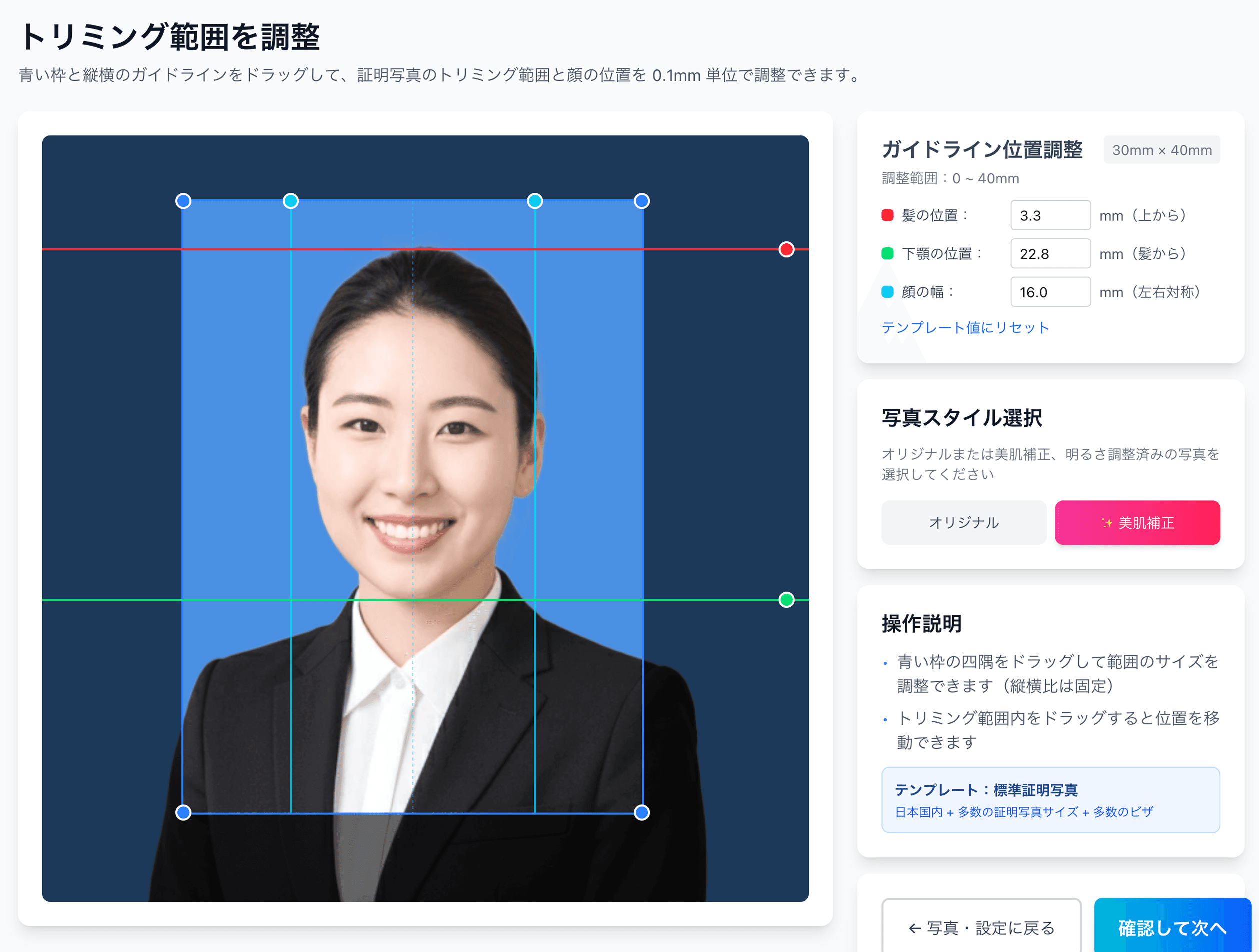
0.1mm face position adjustment
Drag the hairline, chin, and face-width guides — or type the millimetre value — to fit inside even a 4mm-wide regulatory window like the My Number spec.
Auto-generated L-size print sheet
Multiple photos optimally arranged on L-size paper with cut marks. Print directly at home or at a convenience store.
AI removes the background automatically
Walls or objects in the original shot are auto-removed; AI converts the photo to the plain background the spec requires.
AI skin smoothing with a natural finish
Auto-reduces blemishes and uneven tone while keeping a natural look. Choose between the original and the smoothed version.
Print at 55,000 convenience stores nationwide
Scan the QR code at the multi-copy machine in Lawson, FamilyMart, Ministop, or Poplar — L-size prints from ¥30. At 7-Eleven, register the image with netprint first.
5-language support, no app required
Japanese, English, Chinese, Korean, and Vietnamese — works entirely in your smartphone browser without installing an app.
Frequently asked questions
Are mild beauty filters really not allowed?
I normally wear contacts but plan to wear glasses on test day — which should I use for the photo?
Is HEIC format really accepted?
What if my file exceeds 5MB?
Can I submit a black-and-white photo?
What if my photo was the wrong size and got rejected?
Related content
Related blog
Glasses ID Photo in Japan: 7 No-Glare Techniques (2026)
In Japan, glasses glare forces ID photo reshoots. Glare is fixed at the shoot, not in software: 7 techniques plus the 4 agencies’ NG rules, from ¥200.
Related blog
Japanese ID Photo Face Position: 0.1mm to Pass Any Spec
In Japan, passport, My Number and residence-card photos share a tight 4mm face tolerance (ICAO Doc 9303). Hit 0.1mm with AI for ¥200, print at a konbini.
Related spec
National Civil Service Exam
40mm × 30mm
Related spec
First-class Architect Exam
45mm × 35mm
Create a Common Test Photo for ¥200
AI evens the background of your unedited smartphone shot and crops it to a 3:4 frame. You get the digital file for Web application and a convenience-store print version for test day, in one go.
Create now — ¥200