Japan University Entrance Exam (Individual) Photo: Spec and How to Create It
Make a photo for Japan's per-university entrance exams (private general, national/public secondary) from a smartphone shot, with AI auto-adjustment, from ¥200.
- Pay after preview · refund guaranteed
- Matches the official spec (verified 2026-05-26)
- Print at any Japan conbini
| Dimensions | 40mm × 30mm | Height × Width |
|---|---|---|
| Face length | Not specified | |
| Top margin | Not specified | |
| Background | Plain or light background, no hat — front-facing, no shadows or patterns | |
| Shoot-by window | Taken within 3 months of application | |
| Official issuer | Individual Universities (National / Public / Private) | 2026-05-26 |
View the official source ↗(Last verified: 2026-05-26)
Only photos taken within the last 3 months are valid — check when your current photo was taken.
Turn a phone shot into a photo that meets this exact spec. Preview the result first — then pay ¥200. Full refund if it's rejected.
Create with this specVerbatim official spec
The quote below is from a leading photo-studio industry guide. There is no nationwide unified spec — each university sets its own requirements in its application guidelines.
- 「紙の出願の場合、最も一般的なサイズは 縦4.0cm × 横3.0cm…大学によって 縦4.5cm × 横3.5cm など微妙に異なるサイズが指定される」
Why this spec matters
⚠️ This page covers per-university entrance exams — private universities' general admissions and national/public universities' secondary (individual) exams. It is different from the Common Test (DNC) Web-application photo (600×450px, max 5MB, no app retouching), and you cannot assume the same photo file will be accepted for both. There is no nationwide unified size for individual exams: the most common convention is 4.0cm × 3.0cm (30×40mm), but some universities specify 4.5cm × 3.5cm or 5cm × 4cm. To avoid late-stage rejection, always check each university's latest application guidelines for size and freshness window. For the Common Test rules, see the dedicated Common Test spec page.
Price & risk comparison
Preview free → pay only if you like it / full refund if rejected
No retakes — final on the spot
Booking & visit required
1–2 weeks lost
* Other prices are typical market estimates. With Ramune you pay only after seeing the result, with a full refund if the photo is rejected.
Preview your photo free firstHow to create it for ¥200
A 30×40mm photo for an individual university entrance exam takes about two minutes with a smartphone and ¥200. Always cross-check with the current application guidelines for each university you're applying to.
- 1
Take the photo on your smartphone
Stand against a plain wall in a bright room. Face the camera directly, no hat, natural expression, eyes on the lens, framed from chest up. - 2
AI removes the background and aligns to spec
Upload the photo. AI removes the background, detects your face, and auto-crops to the most common 30×40mm size. For universities specifying 4.5×3.5cm or other sizes, use the custom-size mode (0.1mm precision). - 3
Print via QR code at any Japan convenience store
After payment, a QR code and 8-digit user number arrive by email. Print on L-size paper at 7-Eleven, FamilyMart, Lawson, Ministop, or Poplar — from ¥30. A JPEG file for web submission is also available for download.
Create a University Entrance Exam Photo for ¥200
AI auto-adjusts your smartphone shot to the most common 30×40mm size used by individual university entrance exams. University-specific sizes (4.5×3.5cm etc.) supported to 0.1mm precision.
Create now — ¥200What Ramune AI ID Photo offers
Even for a tight spec like My Number, you can finish the entire shoot → process → print workflow in your browser.
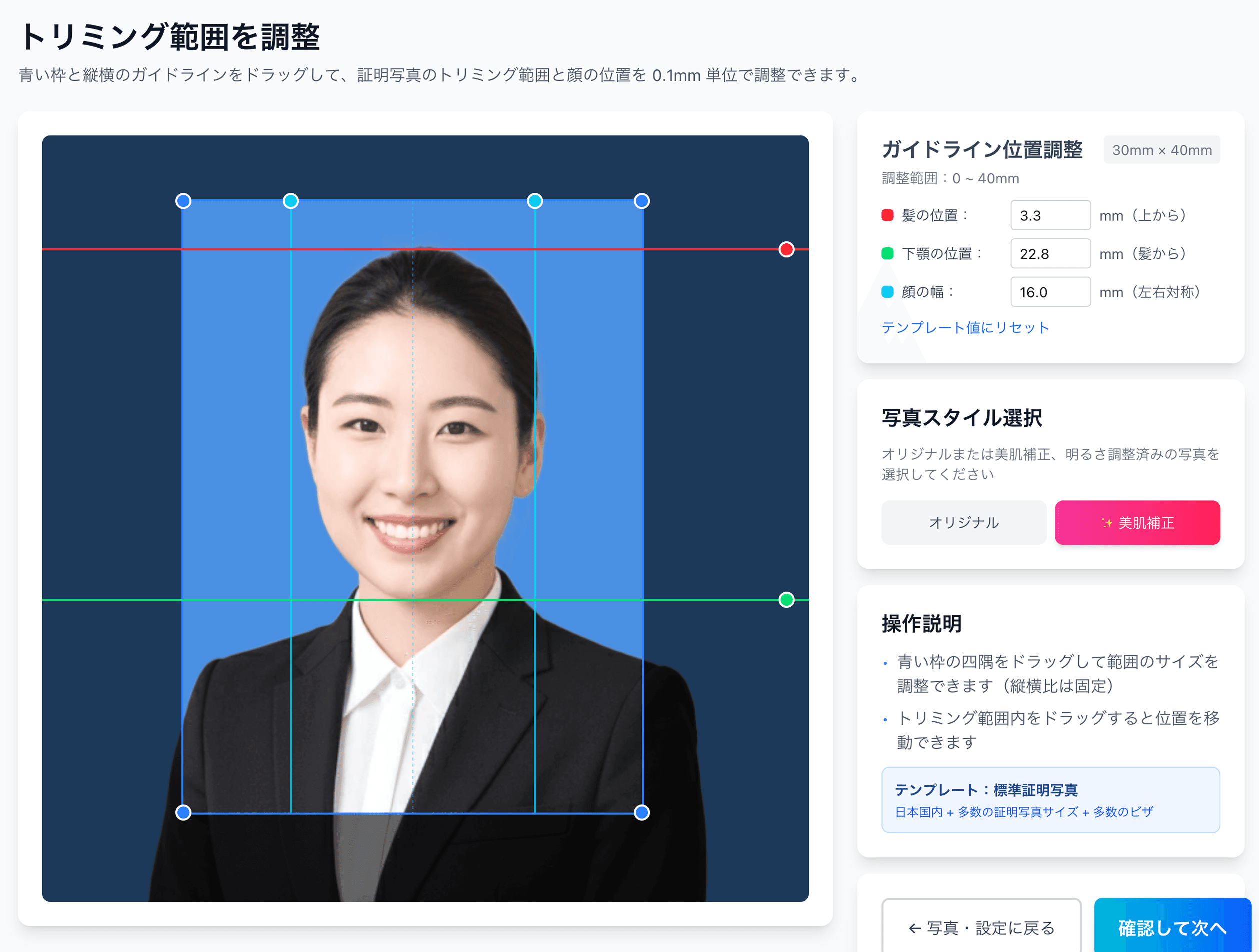
0.1mm face position adjustment
Drag the hairline, chin, and face-width guides — or type the millimetre value — to fit inside even a 4mm-wide regulatory window like the My Number spec.
Auto-generated L-size print sheet
Multiple photos optimally arranged on L-size paper with cut marks. Print directly at home or at a convenience store.
AI removes the background automatically
Walls or objects in the original shot are auto-removed; AI converts the photo to the plain background the spec requires.
AI skin smoothing with a natural finish
Auto-reduces blemishes and uneven tone while keeping a natural look. Choose between the original and the smoothed version.
Print at 55,000 convenience stores nationwide
Scan the QR code at the multi-copy machine in Lawson, FamilyMart, Ministop, or Poplar — L-size prints from ¥30. At 7-Eleven, register the image with netprint first.
5-language support, no app required
Japanese, English, Chinese, Korean, and Vietnamese — works entirely in your smartphone browser without installing an app.
Frequently asked questions
Is the photo spec the same for individual university exams and the Common Test?
Universities use different sizes — how do I handle this?
If I apply to multiple universities, can I reuse the photo?
Does it work for both web submissions and paper applications?
What if my target university specifies 4.5×3.5cm?
What if my photo was the wrong size and got rejected?
Related content
Related blog
Japan Job-Hunting (Shukatsu) Photo: Recruiter Truth, ¥200
In Japan, 87.3% of new grads say the recruit photo matters. Face left unretouched — only position and background fit the 4×3cm spec. Studio quality for ¥200.
Related spec
University Common Entrance Test
40mm × 30mm
Related spec
Senior High School Entrance Exam
40mm × 30mm
Related spec
Junior High School Entrance Exam
40mm × 30mm
Create a University Entrance Exam Photo for ¥200
AI auto-adjusts your smartphone shot to the most common 30×40mm size used by individual university entrance exams. University-specific sizes (4.5×3.5cm etc.) supported to 0.1mm precision.
Create now — ¥200