Japan Junior High School Entrance Exam Photo: Spec and How to Create It
Make a photo for Japan's private junior high school entrance exam (chugaku juken) — the first big milestone for 6th graders — from a smartphone shot with AI auto-adjustment, from ¥200.
- Pay after preview · refund guaranteed
- Matches the official spec (verified 2026-05-26)
- Print at any Japan conbini
| Dimensions | 40mm × 30mm | Height × Width |
|---|---|---|
| Face length | Not specified | |
| Top margin | Not specified | |
| Background | Plain or light background (blue/grey) — front-facing, no hat, no shadows or patterns | |
| Shoot-by window | Taken within 3 months of application | |
| Official issuer | Individual Private Junior High Schools (no nationwide body) | 2026-05-26 |
View the official source ↗(Last verified: 2026-05-26)
Only photos taken within the last 3 months are valid — check when your current photo was taken.
Turn a phone shot into a photo that meets this exact spec. Preview the result first — then pay ¥200. Full refund if it's rejected.
Create with this specVerbatim official spec
There is no nationwide unified spec for Japan's junior high school entrance exam photo. Below is a widely cited industry convention note. Always verify your target school's admissions guide.
- 「縦4cm×横3cm が証明写真の一般的なサイズ…大半の学校では、このサイズを指定するケースが多い」
Why this spec matters
⚠️ Photo requirements for Japan's junior high school entrance exam (private and combined JHS/HS schools) are set individually by each school — there is no nationwide unified spec. The 30×40mm (4cm × 3cm) size and 3-month freshness window shown here are the most widely adopted conventions, but some schools require 35×45mm or their own custom size. About 50,000 6th graders sit chugaku juken each year, mainly in Tokyo and Kansai, after years of family-supported cram-school preparation. A photo rejection means re-applying the following year — an enormous emotional burden on a 12-year-old and the whole family. Always verify size, freshness window, and back-side name requirements against your target school's latest admissions guide.
Price & risk comparison
Preview free → pay only if you like it / full refund if rejected
No retakes — final on the spot
Booking & visit required
1–2 weeks lost
* Other prices are typical market estimates. With Ramune you pay only after seeing the result, with a full refund if the photo is rejected.
Preview your photo free firstHow to create it for ¥200
A junior high school entrance exam photo takes about two minutes with a smartphone and ¥200. Always cross-check with your target school's current admissions guide.
- 1
Take the photo on your smartphone
Stand against a plain wall in a bright room. Wear a plain white shirt or school uniform, no hat, brush bangs away from the eyes, natural expression, eyes on the lens. A family member should take the photo. - 2
AI removes the background and aligns to spec
Upload the photo. AI removes the background, detects the face, and auto-crops to 30×40mm. If your target school uses a different size, fine-tune to 0.1mm precision. - 3
Print via QR code at any Japan convenience store
After payment, a QR code and 8-digit user number arrive by email. Print on L-size paper at 7-Eleven, FamilyMart, Lawson, Ministop, or Poplar — from ¥30. A JPEG file for online submission is also available for download.
Create a Junior High School Entrance Exam Photo for ¥200
AI auto-adjusts your smartphone shot to the standard 30×40mm size used by most Japan private JHSs. Custom sizes are supported to 0.1mm precision.
Create now — ¥200What Ramune AI ID Photo offers
Even for a tight spec like My Number, you can finish the entire shoot → process → print workflow in your browser.
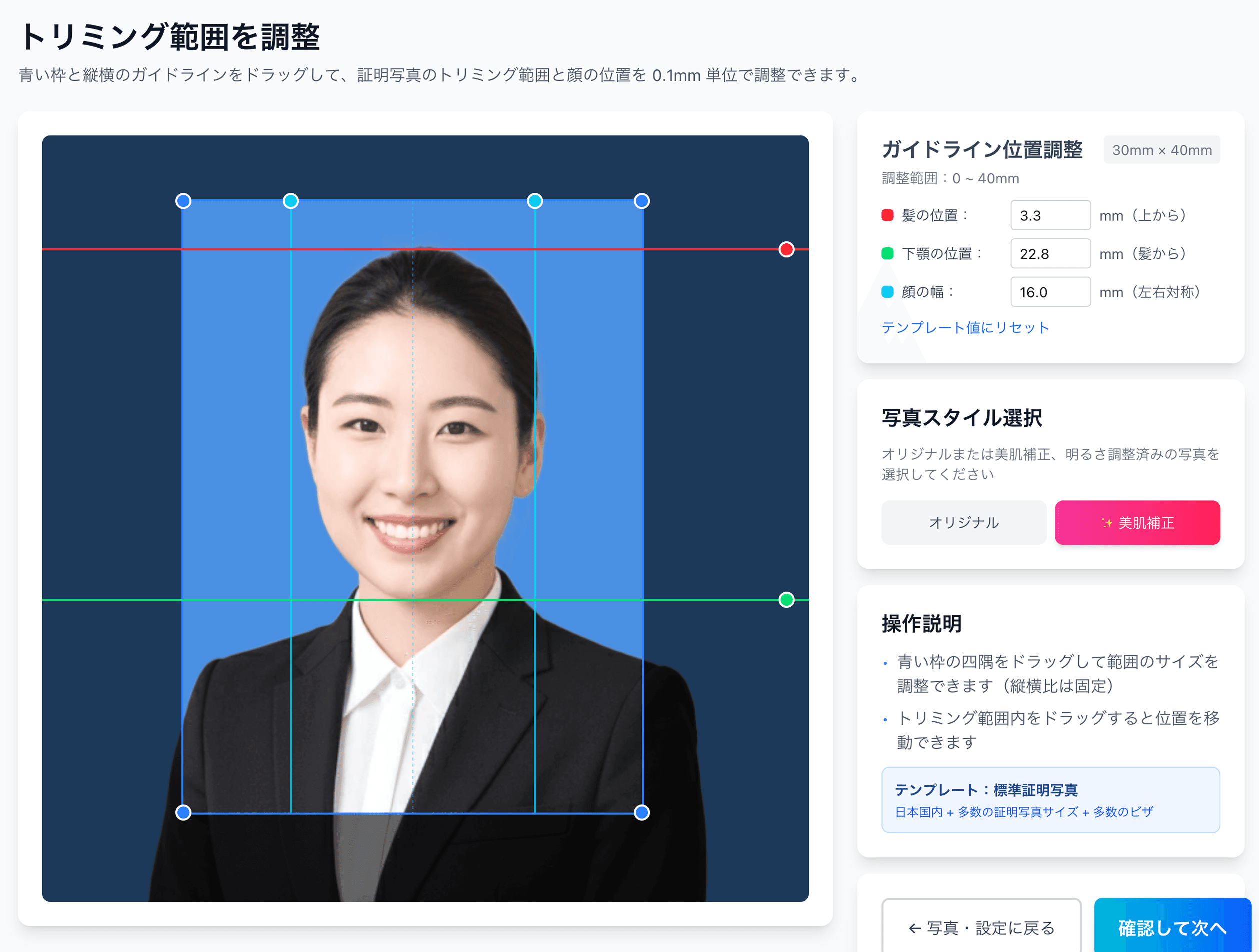
0.1mm face position adjustment
Drag the hairline, chin, and face-width guides — or type the millimetre value — to fit inside even a 4mm-wide regulatory window like the My Number spec.
Auto-generated L-size print sheet
Multiple photos optimally arranged on L-size paper with cut marks. Print directly at home or at a convenience store.
AI removes the background automatically
Walls or objects in the original shot are auto-removed; AI converts the photo to the plain background the spec requires.
AI skin smoothing with a natural finish
Auto-reduces blemishes and uneven tone while keeping a natural look. Choose between the original and the smoothed version.
Print at 55,000 convenience stores nationwide
Scan the QR code at the multi-copy machine in Lawson, FamilyMart, Ministop, or Poplar — L-size prints from ¥30. At 7-Eleven, register the image with netprint first.
5-language support, no app required
Japanese, English, Chinese, Korean, and Vietnamese — works entirely in your smartphone browser without installing an app.
Frequently asked questions
Are the JHS and HS entrance exam photo specs the same?
Can I reuse the same photo when applying to multiple junior high schools?
My child gets nervous and ends up smiling. What should I do?
What's the difference between online (web) and paper submissions?
Isn't a 3-month window strict, given that 6th graders grow fast?
What if my photo was the wrong size and got rejected?
Related content
Related blog
Japan Job-Hunting (Shukatsu) Photo: Recruiter Truth, ¥200
In Japan, 87.3% of new grads say the recruit photo matters. Face left unretouched — only position and background fit the 4×3cm spec. Studio quality for ¥200.
Related spec
Senior High School Entrance Exam
40mm × 30mm
Related spec
University Entrance Exam (Individual)
40mm × 30mm
Related spec
University Common Entrance Test
40mm × 30mm
Create a Junior High School Entrance Exam Photo for ¥200
AI auto-adjusts your smartphone shot to the standard 30×40mm size used by most Japan private JHSs. Custom sizes are supported to 0.1mm precision.
Create now — ¥200