Japan Certified Social Worker National Exam: Photo Spec and How to Create It
Create an exam photo that follows the official guidance from the Social Welfare Promotion & National Examination Center (SSC), from a smartphone shot, for ¥200. Supports both the current paper-based "Exam Photo Confirmation Form" workflow and the upcoming online application from Round 39 (Feb 2027).
- Pay after preview · refund guaranteed
- Matches the official spec (verified 2026-05-27)
- Print at any Japan conbini
| Dimensions | 45mm × 35mm | Height × Width |
|---|---|---|
| Face length | Not specified | |
| Top margin | Not specified | |
| Background | Plain background — a white or light-colored wall is recommended, with no shadows, patterns, or gradients | |
| Shoot-by window | Taken within 6 months of application | |
| Official issuer | MHLW / Social Welfare Promotion & National Examination Center (SSC) | 2026-05-27 |
View the official source ↗(Last verified: 2026-05-27)
Only photos taken within the last 6 months are valid — check when your current photo was taken.
Turn a phone shot into a photo that meets this exact spec. Preview the result first — then pay ¥200. Full refund if it's rejected.
Create with this specVerbatim official spec
Below is the Japanese-original summary of the spec from the SSC official application guide (38th-round handbook). Because the official PDF is binary and resists clean text extraction, only points consistently confirmed across multiple official references are shown here.
- 「縦 4.5cm × 横 3.5cm、申込前 6 か月以内に撮影、正面・脱帽・肩から上、両目開・顔はっきり (試験中眼鏡を着用する場合は撮影時も着用)」
- 「全員が提出するもの: 受験用写真等確認票」
- 「受験用写真等確認票に写真を貼付」
Why this spec matters
The Certified Social Worker (Shakai Fukushi-shi) qualification is a Japanese national license established under the Certified Social Worker and Certified Care Worker Act (1987) and administered by the Social Welfare Promotion & National Examination Center (SSC). The role centers on consultation and casework for older adults, people with disabilities, children, and people in financial hardship, with major workplaces including medical social work in hospitals, community comprehensive support centers, child consultation centers, government, and councils of social welfare. The 38th round (February 2026) recorded 25,430 candidates and 15,438 passers — a 60.7% pass rate, the highest on record. There are 12 routes to eligibility (e.g. 4-year welfare-major degree, junior college plus practical experience, general degree plus training institute), and the exam is a mark-sheet test of 19 subjects across 129 questions in 225 minutes at sites in 24 prefectures. The photo is the familiar passport-size 45×35mm, but it must be pasted onto the dedicated "Exam Photo Confirmation Form" — required for everyone under the paper application used through Round 38. From Round 39 (February 2027), SSC plans to migrate fully to online application: the printed photo will be replaced by an uploaded image file, while the main exam remains mark-sheet (no CBT). Note that the Certified Care Worker, administered by the same SSC under the same law, is a fully separate qualification — it covers direct care (physical care, daily-life support) rather than consultation, so do not confuse the two when applying.
Price & risk comparison
Preview free → pay only if you like it / full refund if rejected
No retakes — final on the spot
Booking & visit required
1–2 weeks lost
* Other prices are typical market estimates. With Ramune you pay only after seeing the result, with a full refund if the photo is rejected.
Preview your photo free firstHow to create it for ¥200
With a smartphone and ¥200, you can prepare a spec-compliant photo for the Confirmation Form in about two minutes.
- 1
Take the photo on your smartphone
Stand against a plain, light-colored wall in a bright room. No hat. Frame from the shoulders up, eyes wide open, neutral expression, eyes on the lens. If you wear glasses during the exam, wear them in the shot as well. - 2
AI removes the background and aligns to spec
Upload the photo. AI removes the background and auto-crops to the 35×45mm ratio. Face position can be fine-tuned to 0.1mm precision, producing a result that follows the SSC official guidance. - 3
Print at a Japan conbini via the emailed QR code, then paste it onto the Confirmation Form and mail it
After payment, a QR code and 8-digit user number arrive by email. Print on L-size glossy paper from ¥30 at any Japan conbini, then paste the photo onto the "Exam Photo Confirmation Form" and mail it in. From Round 39 (Feb 2027) onward, the workflow is expected to switch to online image upload.
Create a Certified Social Worker exam photo for ¥200
AI auto-adjusts your smartphone shot to the 35×45mm spec. A QR code for convenience-store printing is emailed to you — print on glossy paper, paste onto the Exam Photo Confirmation Form, and mail it in.
Create now — ¥200What Ramune AI ID Photo offers
Even for a tight spec like My Number, you can finish the entire shoot → process → print workflow in your browser.
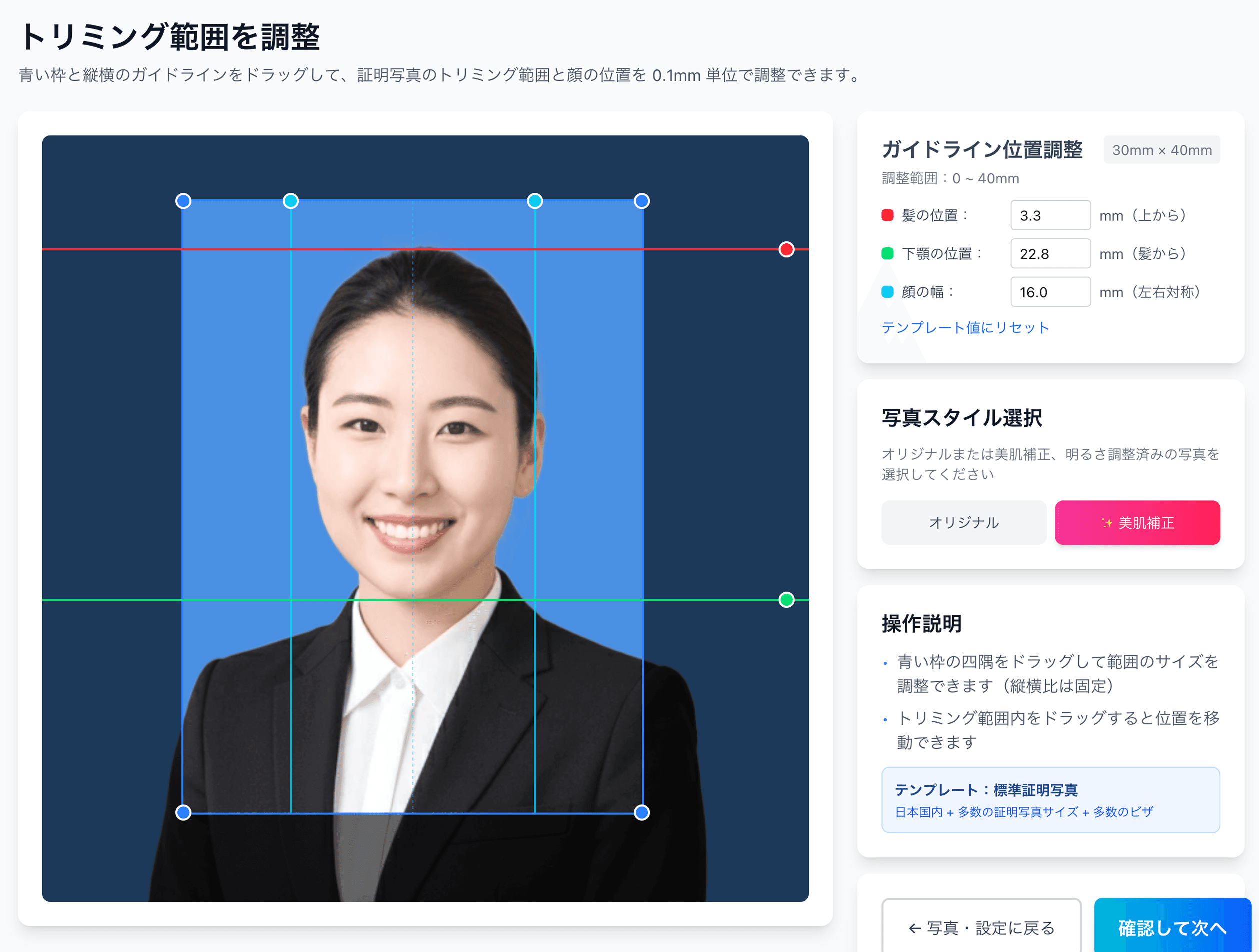
0.1mm face position adjustment
Drag the hairline, chin, and face-width guides — or type the millimetre value — to fit inside even a 4mm-wide regulatory window like the My Number spec.
Auto-generated L-size print sheet
Multiple photos optimally arranged on L-size paper with cut marks. Print directly at home or at a convenience store.
AI removes the background automatically
Walls or objects in the original shot are auto-removed; AI converts the photo to the plain background the spec requires.
AI skin smoothing with a natural finish
Auto-reduces blemishes and uneven tone while keeping a natural look. Choose between the original and the smoothed version.
Print at 55,000 convenience stores nationwide
Scan the QR code at the multi-copy machine in Lawson, FamilyMart, Ministop, or Poplar — L-size prints from ¥30. At 7-Eleven, register the image with netprint first.
5-language support, no app required
Japanese, English, Chinese, Korean, and Vietnamese — works entirely in your smartphone browser without installing an app.
Frequently asked questions
Is the photo spec the same as the Certified Care Worker exam?
I heard that Round 39 (February 2027) will move to online-only application.
What are the 12 eligibility routes?
Is there a CBT version?
How is this different from the Care Manager (Kaigo Shien Senmoin)?
What if my photo was the wrong size and got rejected?
Related content
Related blog
Japanese ID Photo Face Position: 0.1mm to Pass Any Spec
In Japan, passport, My Number and residence-card photos share a tight 4mm face tolerance (ICAO Doc 9303). Hit 0.1mm with AI for ¥200, print at a konbini.
Related spec
Certified Care Worker
45mm × 35mm
Related spec
Care Manager Exam (Ceamaneger)
40mm × 30mm
Related spec
Public Health Nurse National Exam
60mm × 40mm
Create a Certified Social Worker exam photo for ¥200
AI auto-adjusts your smartphone shot to the 35×45mm spec. A QR code for convenience-store printing is emailed to you — print on glossy paper, paste onto the Exam Photo Confirmation Form, and mail it in.
Create now — ¥200